
The WordPress Setup Checklist for AI Search Visibility in 2026
A complete WordPress setup checklist for AI search visibility. Schema, content architecture, plugins, and publishing cadence: everything you need to get cited.
How Visible Is Your Business in AI Search?
Find out in 60 seconds. Our free AI Visibility Checker scans ChatGPT, Perplexity, and Google AI Overviews for your brand.
Check Your AI Visibility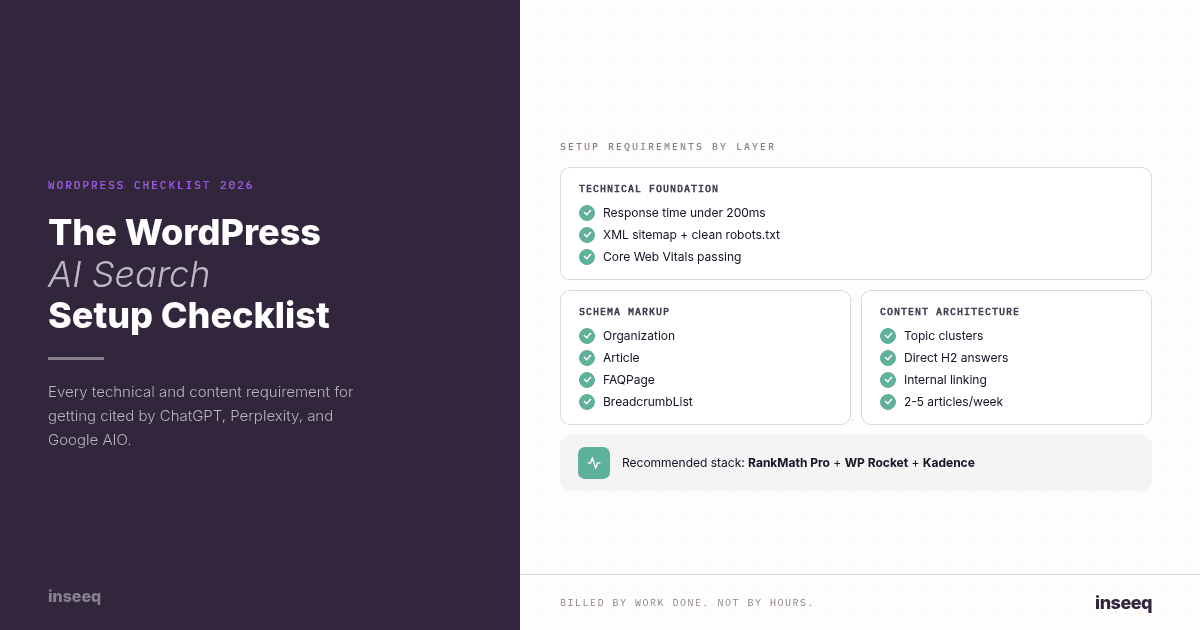
WordPress AI search setup checklist covering technical, schema, and content requirements
Building a Site vs. Building a Citation Machine
Most WordPress site builds optimize for two things: visual appearance and Google rankings. The result is a site that looks professional and loads quickly, targets a handful of keywords, and gets somewhere on page one of Google over the following six months.
That's the old model. It's not wrong. It's just incomplete.
AI search engines (ChatGPT, Perplexity, Google AI Overviews) evaluate websites differently from Google. A WordPress site that's optimized only for traditional search can have strong Google rankings and zero AI citation share. The brands getting cited by AI in 2026 built their sites with a different checklist.
This is that checklist.
The Foundation: Technical Setup for AI Citability
Before any content goes live, the technical foundation determines whether AI crawlers can index and understand your site correctly. These are the non-negotiables.
Server and Hosting
Hosting with response times under 200ms (LiteSpeed or NginX-based hosting, or managed WordPress like Kinsta, WP Engine, or Cloudways)
PHP 8.2+
HTTPS enforced sitewide with a valid SSL certificate
No mixed content warnings
Core Web Vitals
Google's Core Web Vitals are a proxy for crawl accessibility. AI search engines use similar indicators when evaluating indexability.
Largest Contentful Paint (LCP): under 2.5 seconds
Cumulative Layout Shift (CLS): under 0.1
Interaction to Next Paint (INP): under 200ms
Recommended plugins: WP Rocket or LiteSpeed Cache for performance; Cloudflare for CDN and caching
Crawlability and Indexation
XML sitemap configured and submitted to Google Search Console
robots.txtreviewed: confirm no important content is accidentally blockedCanonical tags configured to prevent duplicate content issues
Clean permalink structure:
/blog/article-slug/not/?p=123
Mobile and Accessibility
Fully responsive at all breakpoints
Text remains readable without horizontal scrolling
All images include descriptive alt text (AI engines use alt text for image entity recognition)
Schema and Structured Data: The Non-Negotiables
Schema markup is the single most impactful technical change most WordPress sites can make for AI citability. AI retrieval systems use structured data to understand what a page is about, who it's by, and how it relates to other content.
Organization Schema (Homepage)
Required fields:
@type: Organizationname: Your brand nameurl: Your homepage URLlogo: URL to your logo imagedescription: A concise, specific statement of what you do (not marketing copy, a factual description)sameAs: Array of your social profile URLs and any authoritative external profiles
Example: inseeq's Organization schema:
{
  "@context": "https://schema.org",
  "@type": "Organization",
  "name": "inseeq",
  "url": "https://www.inseeq.com",
  "description": "AI-native marketing agency specializing in GEO, AI search visibility, and WordPress website builds for B2B startups.",
  "sameAs": ["https://www.linkedin.com/company/inseeq", "https://twitter.com/inseeq"]
}
Article Schema (All Blog Posts)
Every article should have Article schema with:
@type: Articleheadline: The article titleauthor: Author name and URLdatePublishedanddateModifiedpublisher: Organization referencemainEntityOfPage: The article URL
RankMath and Yoast SEO Premium generate this automatically. Configure the plugin, and it's done for every post.
FAQPage Schema
FAQPage schema is the highest-leverage schema for AI citability. AI engines systematically extract FAQ content to answer user queries, and FAQPage schema makes your FAQ directly parseable.
Add FAQ schema to:
Every blog post's FAQ section
Service pages with question-and-answer content
Landing pages where buyers have common questions
Both RankMath and Yoast support FAQ schema blocks within the Gutenberg editor. Add a FAQ block, enter each Q&A pair, and the schema is generated automatically.
BreadcrumbList Schema
BreadcrumbList schema gives AI engines a clear map of your content hierarchy: Home > Blog > Category > Article. This signals topical organization to AI retrieval systems.
Enable in your schema plugin settings. It typically requires one checkbox once Organization schema is configured.
Content Architecture That AI Engines Can Parse
Technical schema markup gets AI engines to notice your content. Content architecture determines whether they cite it.
Topical Cluster Structure
Each topic area should have:
One pillar article (2,000+ words, comprehensive coverage of the topic)
6-12 supporting articles (each covering a specific subtopic or buyer question in depth)
Internal links connecting all articles within the cluster
Service pages that link into the cluster and that the cluster links back to
This structure signals topical authority: the signal AI engines use to decide whether a domain is a credible source in a given category.
H2 Section Architecture
Every H2 section should follow this format:
H2 heading = a specific question the reader has
First paragraph = direct answer to that question (40-60 words, extractable)
Remaining paragraphs = supporting evidence, examples, context
AI engines frequently cite the first paragraph of an H2 section. If the answer is buried in paragraph four, it won't get cited.
Tables for Reference Data
Any time you're presenting comparison data, specifications, or structured information, use a table. AI engines extract tabular data reliably and cite it frequently in responses that compare options.
Internal Linking Density
Every article should link to:
At least 2-3 related articles in the same topic cluster
At least 1 service page relevant to the topic
Service pages should link to the most relevant 2-3 articles in each cluster.
The Publishing Infrastructure
Content architecture determines the quality of individual pieces. Publishing infrastructure determines whether you build the topical authority and freshness signals that AI citation requires.
Editorial Calendar Setup
For a competitive B2B category, the minimum viable publishing cadence for GEO is two articles per week. More competitive categories require 3-5. One article per month will not build the topical authority depth or freshness signals that drive AI citations.
Build the editorial calendar backward from the topical authority target: for each cluster, map the 8-12 articles needed to establish authority, sequence them logically (foundational content first, then specific subtopics), and assign publish dates.
Category and Tag Taxonomy
WordPress category and tag structure should mirror the topical authority cluster architecture. Each category corresponds to a content cluster. Use categories consistently: every article should have exactly one primary category that maps to its cluster.
Tags should be used for cross-cluster connections (e.g., a tag for "GEO" that spans multiple categories: GEO agency, GEO for B2B, GEO for WordPress). This creates an additional layer of internal linking that reinforces topical connections.
Content Templates
Enforce citation-ready structure by default with a standard article template:
Concrete scenario opener (3-5 sentences)
5-8 H2 sections, each answering a specific question
FAQ section (5-7 questions derived from People Also Ask research)
CTA section
When this is the default template, every piece of content that goes live is already structurally sound for AI extraction.
The Monitoring Stack
A citation-ready WordPress setup is only useful if you're measuring whether it's working.
Manual citation testing: Run 20-40 test queries across ChatGPT, Perplexity, and Google AI Overviews using the questions your buyers ask. Document which sources are cited. Repeat monthly.
AI citation tools: Platforms like Profound, Superlines, and Brandwatch AI monitor brand mentions and citation share in AI search responses automatically. These are the equivalent of rank trackers for AI search.
Google Search Console: Monitor for AI Overviews appearances and the queries triggering them. GSC now reports some AI Overview impression data.
Referral traffic tracking: Tag AI referral sources in your analytics. Traffic from chat.openai.com, perplexity.ai, and AI Overview clicks should be tracked separately from organic search traffic so you can measure conversion rate differences.
The inseeq WordPress Build Standard
Every WordPress site inseeq builds for clients includes the full citation-ready architecture described in this checklist, not as an add-on, but as the default.
The reasoning is simple: the technical layer takes the same amount of time whether you do it at launch or retroactively. Doing it at launch means every piece of content published from day one is indexed and parsed correctly. Retroactive fixes mean months of content that should have been building topical authority was instead signaling nothing useful to AI engines.
inseeq's WordPress builds combine the technical foundation (schema, performance, crawlability) with the content infrastructure (cluster taxonomy, article templates, editorial calendar framework) in a single engagement. Clients typically start publishing citation-ready content within two weeks of site launch.
For the specific content side of this equation, see Why Your WordPress Site Isn't Getting Cited by AI (And How to Fix It): the companion article covering content citability in detail.
Frequently Asked Questions
What WordPress plugins help with AI search? RankMath Pro and Yoast SEO Premium both handle schema markup (Organization, Article, FAQPage, BreadcrumbList) with minimal manual work. WP Rocket or LiteSpeed Cache handles performance optimization for Core Web Vitals. A good CDN (Cloudflare) handles global response times. These three categories cover the technical essentials.
How do I optimize WordPress for ChatGPT? The core requirements: Organization schema on your homepage, Article schema on all posts, FAQPage schema on pages with Q&A content, a clean crawlable site structure, and topical authority content clusters covering your key categories. ChatGPT specifically also responds to consistent brand mention patterns across the wider web, beyond just your own site.
Does WordPress work well for AI SEO? Yes. WordPress with proper configuration is one of the most citation-ready CMS platforms available. The plugin ecosystem (RankMath, Yoast, WP Rocket) makes implementing the technical requirements straightforward. The main risk is that WordPress sites are often configured with the wrong priorities: optimized for visual design rather than AI citability.
What is the best WordPress setup for GEO? A clean, fast theme (Kadence or GeneratePress), RankMath Pro for schema, WP Rocket for performance, a category taxonomy that mirrors your topical cluster architecture, FAQ schema blocks on every article, and a consistent editorial calendar producing 2-5 articles per week. This combination covers both the technical and content requirements.
How do I add FAQ schema to WordPress? Using RankMath or Yoast SEO Premium: in the Gutenberg editor, add a FAQ block at the end of your article. Enter each question and answer pair. The plugin automatically generates the FAQPage JSON-LD schema. No manual coding required.
Want This Done for You?
Setting up a citation-ready WordPress site correctly takes expertise that most developers and traditional web agencies don't have. The schema configuration, content architecture, cluster taxonomy, and publishing infrastructure have to work together. Individual pieces in isolation don't produce citation results.
inseeq builds WordPress sites specifically for AI search visibility, with the full technical and content stack deployed from day one.
Book your free Growth Audit and see what a citation-ready WordPress setup would look like for your company.
Check Your AI Visibility
How visible is your brand in AI search engines like ChatGPT, Perplexity, and Google AI Overviews? Find out in 60 seconds with our free tool.
Related Articles
→ Why Your WordPress Site Isn't Getting Cited by AI (And How to Fix It)
→ How to Optimize Your Website for ChatGPT Search | ChatGPT SEO
→ What is Generative Engine Optimization (GEO)? The Complete 2026 Guide

Hans-Peter Frank
Co-founder
How Visible Is Your Business in AI Search?
Find out in 60 seconds. Our free AI Visibility Checker scans ChatGPT, Perplexity, and Google AI Overviews for your brand.
Check Your AI Visibility