
Should You Switch to Broad Match with Smart Bidding? 12 B2B Paid Ads Questions Answered for 2027
Google, LinkedIn and Meta all tell you to go broad, automate bidding and raise the budget. Here is what experienced B2B advertisers do instead, question by question, for accounts that start from zero.
Ready for AI Search Optimization?
Get a personalized roadmap to make your brand visible in AI search results. Free growth audit with actionable insights.
Get Your Free Growth Audit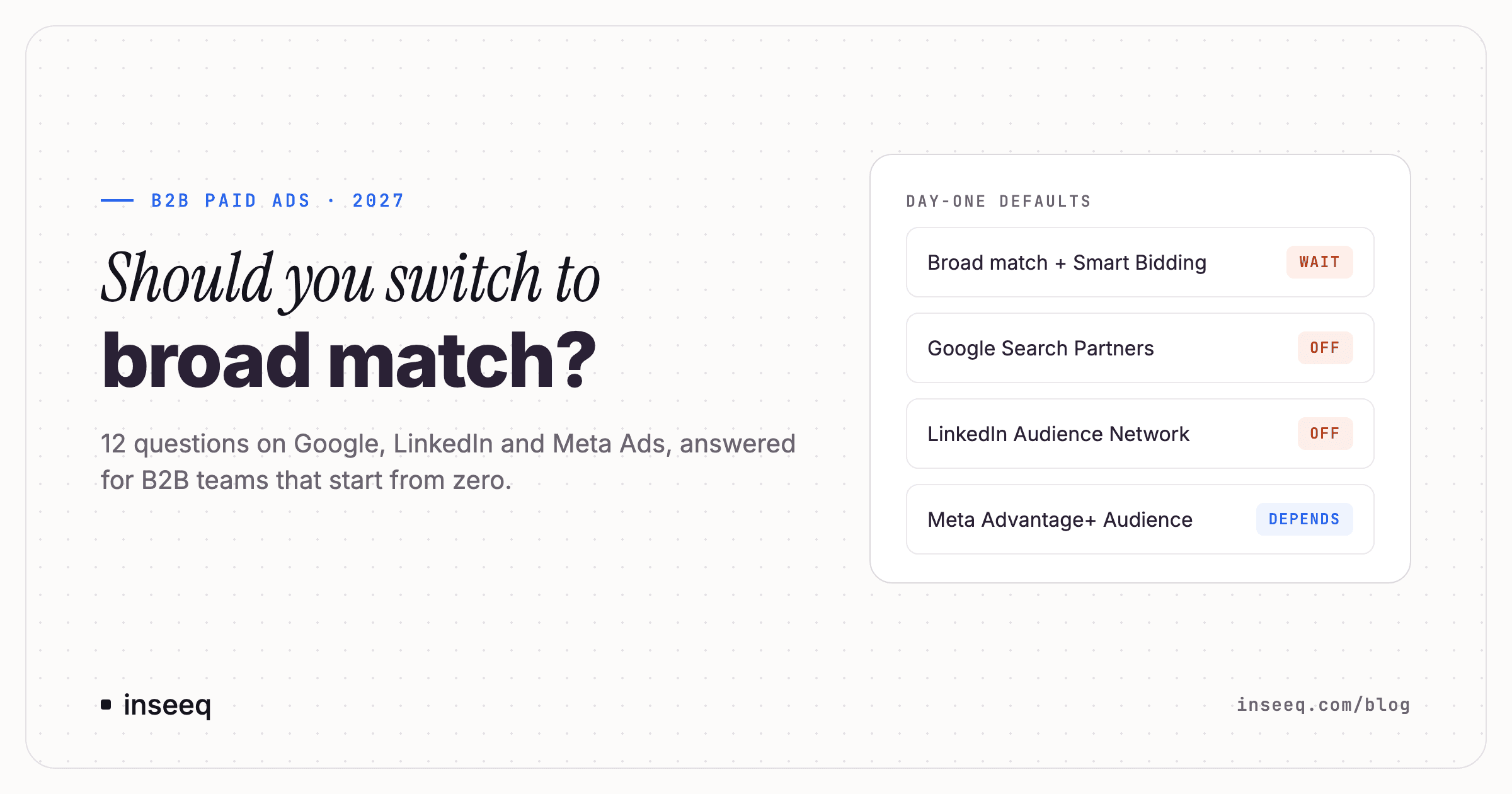
B2B paid ads day-one defaults: broad match with Smart Bidding wait, Google Search Partners off, LinkedIn Audience Network off, Meta Advantage+ Audience depends
Every ad platform gives B2B teams the same advice. Go broad. Automate bidding. Let the AI find your buyer. Raise the budget.
For an account with years of conversion data, some of that advice is sound. For a B2B company that starts paid ads from zero with 3,000 to 15,000 a month, most of it burns budget before the account has learned anything.
We collected the questions B2B teams ask most often when they start on Google, LinkedIn and Meta, and answered each one the way experienced practitioners handle it in live accounts. The full playbook, with the day-one checklists for all three platforms, is in our free guide.
The B2B Paid Ads Practice Guide 2027. 15 decisions, a 42-point day-one setup checklist for Google, LinkedIn and Meta, a budget split for 3k to 15k a month, and a chapter on EU consent rules. Download the free guide
1. Google Ads or LinkedIn Ads: which platform should a B2B company start with?
Start where demand already exists. If your buyers search for your category, start with Google Search. It captures people who already know what they want. LinkedIn creates demand among people who are not searching yet. Meta works best as a retargeting layer behind the other two.
The order reverses when your category is new. If nobody searches for what you sell, Google has nothing to capture, and LinkedIn goes first.
Two more checks decide whether LinkedIn works at all:
Deal size. As a rule of thumb, LinkedIn pays off from a customer lifetime value of about 10,000 to 15,000. At that value, paying 500 for a sales-qualified demo is cheap.
Budget. Fund one platform properly before you add a second. When a new B2B account fails, the budget is usually spread too thin. The platform choice is rarely the problem.
Add the second platform when the first one has a stable cost per lead that you can verify in your CRM. A date in the calendar is the wrong trigger.
2. Should you switch to broad match with Smart Bidding?
Not at the start. Google recommends broad match combined with Smart Bidding, and in accounts with high conversion volume the combination can work. It depends on two inputs: enough conversions for the algorithm to learn from, and a value signal that tells it which conversions matter.
A new B2B account has neither. With a few conversions a month, broad match spends on loosely related queries, and Smart Bidding cannot tell a qualified lead from a student downloading a whitepaper.
What experienced B2B advertisers do instead:
Exact and phrase match only in the first months.
Themed ad groups of 5 to 15 keywords with 1 to 3 responsive search ads.
A negative keyword list live before the first impression.
Manual CPC or Maximize Clicks without a target.
Test broad match later, in a separate campaign, once your conversion tracking feeds real pipeline data back from the CRM.
3. What are Google Search Partners, and should you turn them off?
Search Partners are hundreds of non-Google websites, plus some other Google sites, that show your search ads outside Google Search itself. They are switched on by default for Search campaigns.
For B2B lead generation, switch them off. In one account where leads were matched against the CRM, 78,383 USD of Search Partners spend produced 2% qualified leads. Google Search itself produced 57%. Search Partners and Display placements are also a common source of spam form fills that inflate reported conversions.
Some advertisers test Search Partners per campaign later. If you do, judge the test on CRM-verified lead quality. Platform conversions will look fine even when the leads are not.
4. Target CPA or Maximize Conversions: how many conversions do you need?
About 30 conversions in 30 days is the most common floor before you move to Target CPA or Target ROAS. Estimates range from 15 to 100, and even Google's own reps give inconsistent numbers.
Below that floor, automated bidding has too little data to learn from and swings unpredictably. Use Manual CPC or Maximize Clicks first. Move to Maximize Conversions, and later Target CPA, when the campaign produces conversions steadily.
One more point matters more than the bid strategy: what counts as a conversion. Set one Primary conversion action per real business outcome and make everything else Secondary. If newsletter sign-ups, PDF downloads and demo requests are all Primary, bidding optimises for the cheapest of them.
5. What is a good Google Ads optimization score?
Somewhere between 70 and 90% is typical for well-run accounts. A score of 100% is not a sign of a good account.
The optimization score measures how many of Google's recommendations you have accepted. Strong accounts reject many of them, because the recommendations often raise budgets, widen match types or add automation that a new account cannot use yet. The score correlates with good accounts. Accepting recommendations to raise it does not make an account better.
Also switch off auto-apply recommendations on day one. It can raise budgets, change keywords to broad match and remove negative keywords without asking. Check the setting monthly, because some options switch back on.
6. Is Performance Max good for B2B lead generation?
Not for a new account. Performance Max needs 30 or more conversions a month, brand exclusions and conversion values from your CRM before it can separate good leads from bad ones. Without those inputs, B2B advertisers report that it fills the pipeline with spam leads.
Wait until Search clears 30 to 50 conversions a month, with brand traffic excluded and CRM values flowing back into Google Ads. Until then, run Search campaigns only.
Want the full Google Ads setup? The guide includes a 14-point day-one checklist for Google Ads, from conversion setup to location settings. Get the free guide
7. Should you use LinkedIn Audience Expansion and the LinkedIn Audience Network?
Switch both off before your first campaign goes live.
Audience Expansion shows your ads to people outside the targeting you built. You spend time defining job functions, seniorities and company sizes, and then the default setting widens it again.
The LinkedIn Audience Network places your ads in third-party apps and websites. In one account, 67% of a month's budget landed in a single mobile puzzle app. Unchecking the Audience Network removes most of the obvious fraud.
While you are in the campaign settings, change two more defaults:
Bidding: use manual CPC below the suggested range. Maximum Delivery, the default, is the most expensive way to buy LinkedIn traffic in most cases. One test spent a full day's budget in five minutes.
Location: use "permanent" location instead of "recent or permanent".
8. How much do LinkedIn ads cost, and what is the minimum budget?
LinkedIn is the most expensive of the three platforms per click. Typical ranges quoted by practitioners:
CPC: 5.50 to 8.50 USD for broad B2B audiences, 9 to 14+ in competitive segments, 20 to 25 for tightly targeted senior audiences.
CPM: 28 to 90 USD, and 150 to 300 for very narrow enterprise audiences.
Cost per lead: 45 to 250 USD is common. Struggling accounts see spikes far above that.
Plan 3,000 to 5,000 a month for a tightly scoped campaign and 5,000 or more for a full funnel from cold audience to deal. A few hundred a month can give early signal on messaging, but it cannot carry a full funnel.
Keep prospecting audiences between 20,000 and 80,000 members. LinkedIn recommends 50,000 to 300,000, but above 80,000 a small budget spreads too thin to learn anything.
9. LinkedIn Lead Gen Forms or a landing page?
On LinkedIn, native Lead Gen Forms usually win. They convert around 13% of clicks, against 2 to 5% for landing pages, because the form is pre-filled with profile data.
The catch is lead quality. Without a qualifying question, you collect leads from people who clicked out of curiosity, and sometimes from profiles with zero connections. Use 3 to 5 fields and add one real qualifier, such as company size, timeline or current tool.
For high-ticket offers with long sales cycles, a landing page with a qualifying step can still be the better choice. The same logic does not carry over to Meta and Google: there, experienced advertisers default to landing pages. The guide explains the difference per platform.
10. Do Facebook ads work for B2B, and is Advantage+ Audience good?
Meta can work for B2B, mostly as a low-cost retargeting layer behind your LinkedIn and Google traffic. Using it as the first platform for B2B lead generation is possible but disputed, and it needs a multi-stage funnel to work.
Three facts shape how Meta behaves for B2B:
No firmographic targeting. Meta removed targeting by employer, job title, industry and company size in 2021 and 2022. Only weak interest proxies remain.
Delivery needs volume. Meta's learning phase needs about 50 conversions per ad set per week. Most B2B accounts cannot reach that with a qualified lead, so they optimise for a proxy event such as landing page view, form start or Lead.
Cheap leads are not cheap opportunities. Meta cost per lead runs roughly 3 to 5 times lower than LinkedIn, but those leads convert to SQL at a lower rate.
Advantage+ Audience depends on budget. In a comparison of 23 accounts, it performed about 30% worse under 5,000 USD a month, about the same between 5,000 and 15,000, and 15 to 20% better above that. At the low end of the budget range, keep it off. When you use it, add hard exclusions, because it can deliver beyond the audiences and locations you set.
If you run instant forms, switch from "More Volume" to "Higher Intent" and add 2 to 3 qualifying questions. The default setting produces a lot of bot and junk submissions.
11. What is a good cost per lead in B2B?
There is no useful answer, and that is the point. Published B2B cost-per-lead figures range from about 3 USD to more than 800, depending on industry, platform and offer. The spread inside one platform is larger than the gap between platforms.
Judge paid channels on cost per opportunity or pipeline per source instead. Those numbers come from your CRM, and they show whether the leads turn into revenue. For orientation, LinkedIn cost per SQL is often quoted at 350 to 800 USD and cost per opportunity at 2,000 to 8,000 USD, with wide variation.
Two more rules keep the comparison honest:
Do not compare cost per lead across platforms. Meta's 7-day click window and LinkedIn's 90-day default measure different things.
Wait 60 to 90 days before judging pipeline. B2B sales cycles are long, and the first 30 days are mostly learning.
12. Enhanced Conversions for Leads or offline conversion import?
Use both. They solve the same problem from two sides: sending CRM outcomes back to Google Ads so bidding learns which clicks turned into qualified pipeline.
Offline conversion import uses the GCLID, the click ID Google adds to your landing page URL. Store it on the CRM contact record and upload MQL and SQL transitions. Imports must arrive within 90 days of the click.
Enhanced Conversions for Leads matches hashed form data such as the email address. It is the more resilient fallback when click IDs get lost. Uploads must arrive within 63 days.
Advertisers disagree on which one should be primary. GCLID matching is more precise, while email matching reaches fewer people. Test both in your own account.
If you advertise in the EU, check Consent Mode v2 first. Google has disabled advertising features for non-compliant EEA accounts since 21 July 2025. In one documented case, a cookie banner looked correct but never passed consent signals to Google's tags, and 60% of a period's conversion data was lost for good. Verify what the tags actually do, and confirm the legal basis for Enhanced Conversions with your data protection officer.
The pattern behind all 12 answers
Google, LinkedIn and Meta all earn more when you spend more, automate more and widen your audience. Every default in this article widens the pool of impressions the platform can sell. A B2B account that starts from zero needs the opposite: a narrow signal that a small budget can saturate, clean conversion data, and a feedback loop from the CRM.
Automation is not wrong. It is early. Once the account has conversion history and CRM data flowing back, broad match, Smart Bidding and Advantage+ become worth testing.
The B2B Paid Ads Practice Guide 2027 puts all of this into one document: the 15 decisions that matter, what to accept and what to decline from each platform, the day-one checklists for Google, LinkedIn and Meta, a budget split for 3,000 to 15,000 a month, lead-quality filters, benchmarks with context, and a chapter on EU and DACH consent rules. Download the free guide

Hans-Peter Frank
Co-founder
Ready for AI Search Optimization?
Get a personalized roadmap to make your brand visible in AI search results. Free growth audit with actionable insights.
Get Your Free Growth Audit