Website Redesign SEO: How LohnDialog Went from Zero Traffic to #1 on Google
A website redesign wiped out LohnDialog's organic traffic. Here's how they recovered, hit #1 on Google, and started generating 3 qualified B2B leads per day.
How Visible Is Your Business in AI Search?
Find out in 60 seconds. Our free AI Visibility Checker scans ChatGPT, Perplexity, and Google AI Overviews for your brand.
Check Your AI Visibility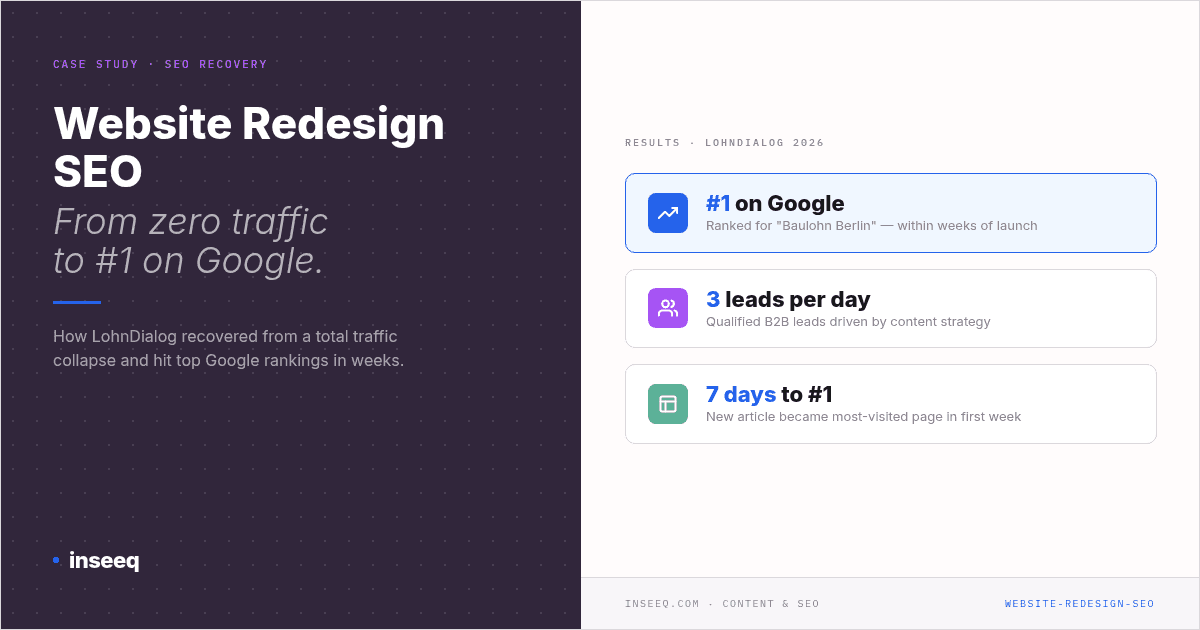
LohnDialog Website Redesign SEO Case Study: From zero traffic to #1 on Google with inseeq
The Redesign That Wiped Out All Their Traffic
The new website is live. The design is clean, the structure is tighter than before, and the launch day felt like a win. Then, a week later, someone opens Google Search Console.
The curve drops sharply. Then flat. Near zero.
That's exactly what happened to LohnDialog Abrechnungs, a Berlin-based payroll outsourcing provider. A website redesign collapsed their organic traffic almost entirely. Everything they'd built up was gone within days of launch. For two years the situation barely improved, even after working with an SEO agency that delivered little to nothing.
This isn't rare. According to an analysis by knallblaumedia.de, visibility losses of up to 80% are possible when a website redesign is executed without a proper SEO plan. And recoveries — when they happen at all — can take months or years.
This article walks through what went wrong at LohnDialog, why it happens so often, how they turned it around, and what every B2B marketing leader can take from this story.
Why Website Redesigns Kill SEO Rankings
A website redesign is one of the highest-risk interventions you can make from an SEO perspective. Get it wrong and you lose in days what took months to build.
The most common causes:
Missing or incorrect 301 redirects
When URLs change during a redesign — which they almost always do — every old URL needs a 301 redirect pointing to its new equivalent. Without it, Google loses the connection to the old page. The link equity built up over time, the trust signals from inbound links, all of it evaporates. Many agencies take a shortcut and redirect everything to the homepage. Google treats that as an error, not a solution.
Changed URL structure without mapping
/services/payroll/ replaces /leistungen/lohnabrechnung/. Sounds minor. To Google, it's a brand new page with no history. The rankings the old URL carried start from zero.
Technical regressions after launch
New themes, new plugins, larger images, restructured navigation. A redesign routinely introduces technical regressions that go unnoticed: slower load times, deeper click depths, missing metadata. Each one erodes rankings.
No content strategy after the launch
Most companies treat the redesign as a finish line. New site is live, job done. But without an active content strategy post-launch, nothing happens. Google needs consistent signals that the site is active and relevant. Go quiet after a redesign and rankings continue to slip.
At LohnDialog, the technical issues were one part of the problem. The absence of any structured content strategy was the other.
What LohnDialog Did Differently (and When)
In January 2026, inseeq took over LohnDialog's content strategy and SEO execution. Not a strategy deck that sits in a drawer — a fully managed content engine that delivered from week one.
Step 1: Content strategy and topic clustering
inseeq built a monthly content roadmap with the LohnDialog team, targeting high-intent topics directly relevant to their audience: Aktivrente, Baulohn, payroll outsourcing, Minijob regulations, and legislative changes like the Ost-West-Angleichung. Topics weren't chosen at random — they came from keyword research into what potential clients were actually searching for.
Step 2: SEO-optimized articles at consistent frequency
inseeq produced multiple SEO-optimized blog articles per week. Every article had correct meta descriptions, focus keywords, and structured content built in from the start. No retroactive optimization. Every article was reviewed and approved by LohnDialog before going live.
Step 3: Fully automated publishing pipeline
inseeq connected directly to LohnDialog's WordPress CMS via API. Once an article was approved, it published automatically at the scheduled time. No copy-pasting, no manual uploads, no formatting. The team described the process as running "completely on autopilot."
Step 4: Technical SEO fixes
inseeq identified two critical technical issues dragging down LohnDialog's rankings. First: click depth. Blog articles were buried so deep in the site structure that Google was barely crawling them. Second: oversized images slowing page load times. Both were flagged, addressed, and resolved alongside the LohnDialog team.
Step 5: Lead capture optimization
inseeq noticed that blog articles had no visible CTAs. The fix: place calls-to-action prominently above the first H2 on every article page. Informational traffic became a conversion opportunity instead of a dead end.
The Results: From Zero to #1 in Weeks
Within weeks of the January 2026 start, measurable results were already showing. Not after six months. Within weeks.
Organic traffic at a two-year high
LohnDialog's organic traffic reached levels not seen in the previous two years, surpassing even their pre-redesign peak. Isabel Kießling from LohnDialog described the moment she saw the traffic chart on a check-in call:
"Das ist ein ordentlicher Herzausschlag, würde ich sagen." ("That's an orderly heartbeat, I'd say.")
#1 on Google for "Baulohn Berlin"
LohnDialog Abrechnungs ranked #1 for the keyword "Baulohn Berlin," confirmed independently using multiple ranking tools by the LohnDialog team. Ines from the LohnDialog team on the moment she found out:
"Da war ich ziemlich erschrocken, wo ich dann sehe: LohnDialog Abrechnungs an Platz 1." ("I was quite shocked when I saw LohnDialog Abrechnungs at position 1.")
Top organic result for Baulohn keywords
For "Baulohn 2026 Änderung" and "Änderung Baulohn," LohnDialog appeared as the first non-sponsored result in Google, above all paid ads.
Aktivrente article: traffic spike after national news coverage
inseeq published content on the Aktivrente topic ahead of the news cycle. When the topic was covered on Tagesschau, Germany's main evening news broadcast, LohnDialog's article experienced a significant traffic spike and became the most visited page on the site after the homepage.
New article ranks #1 within 7 days
An article on Tariflohnbau became the most visited page on the entire site within its first 7 days of publication. Peter from the LohnDialog team:
"Gestern waren 60 Leute drauf. Das ist großartig für einen brandneuen Artikel." (Yesterday, 60 people were on it. That's great for a brand new article.)
3 qualified B2B leads per day
The content strategy drove consistent whitepaper downloads, generating approximately 3 qualified B2B leads per day — companies that LohnDialog's sales team could follow up directly.
LinkedIn reach and a direct inbound call
LohnDialog repurposed inseeq content into a LinkedIn post. Isabel Kießling:
"Der [LinkedIn-Post] ging wirklich unheimlich gut und wir hatten tatsächlich auch einen Interessenten, der darüber angerufen hat." (The LinkedIn post performed incredibly well, and we actually had a prospect call us directly because of it.)
Website Redesign SEO Checklist: What to Lock Down Before and After Launch
A website redesign doesn't have to be an SEO disaster. With the right preparation, ranking losses can be avoided or at minimum contained. This checklist is built from the mistakes made at LohnDialog and the steps that fixed them.
Before the Redesign
Map every 301 redirect before launch
Build a complete URL mapping document before go-live. Every old URL needs a redirect to its closest new equivalent. No blanket redirects to the homepage. Google treats those as errors, not signals. According to SISTRIX, redirect mapping is the most error-prone phase of any website migration.
Export your current rankings as a baseline
Pull your rankings from Google Search Console and at least one ranking tool before launch. That data is your recovery benchmark. Without it, you can't measure what the redesign cost you or whether you've recovered.
Run a content audit
Which pages are actually driving traffic and rankings? Those pages must be preserved in content and redirected correctly. Pages with no traffic and no inbound links can be consolidated or removed without much risk.
Check your technical baseline
Load times, Core Web Vitals, mobile usability. The new site needs to match or beat the old site on every technical metric. New themes frequently introduce regressions that aren't obvious until rankings start dropping.
Watch your click depth
Blog articles and key landing pages should be reachable within three clicks from the homepage. Deeper structures get crawled less frequently and rank less well.
After the Redesign
Verify every redirect, don't just trust the setup
Set up isn't the same as verified. Tools like Screaming Frog or SISTRIX will catch broken or missing redirects that manual checks miss.
Start your content strategy on day one
Don't wait. The new site needs fresh content from the moment it goes live. A structured content plan with clear topics and publishing frequency signals to Google that the site is active and worth crawling.
Put CTAs on every article above the fold
Informational traffic without a conversion path is wasted. Place calls-to-action prominently on every article, ideally before the first H2 heading.
Compress your images
Oversized images are a common and easily avoidable cause of slower page loads. Tools like TinyPNG or the WordPress plugin Smush handle this automatically.
Monitor for at least 90 days
It takes time for Google to fully crawl and re-evaluate a redesigned site. Track rankings, impressions, and traffic for at least three months and act quickly on anything that looks off.
Task | Timing | Priority |
|---|---|---|
URL mapping and 301 redirects | Before launch | Critical |
Rankings export / baseline | Before launch | High |
Start content strategy | Day 1 post-launch | High |
Verify all redirects | Week 1 post-launch | Critical |
Compress images | Before/after launch | Medium |
Audit click depth | Week 1-2 post-launch | High |
Add CTAs to all articles | Day 1 post-launch | High |
90-day monitoring | Ongoing | High |
Frequently Asked Questions (FAQ)
Does a website redesign affect SEO?
Yes, significantly. A redesign changes URLs, site structure, load times, and technical signals. Without careful SEO preparation, specifically 301 redirects and technical quality checks, rankings can collapse within days of launch.
What is website redesign SEO?
Website redesign SEO refers to the process of planning and executing a redesign in a way that preserves or improves search rankings. It covers redirect mapping, technical audits, content strategy, and post-launch monitoring to ensure the redesign doesn't wipe out existing organic visibility.
How long does it take to recover SEO after a redesign?
It depends on how much damage was done and how quickly it's addressed. Companies that set up correct redirects, fix technical issues, and launch an active content strategy can see measurable improvements within weeks. At LohnDialog, positive signals were visible within the first weeks of working with inseeq, starting January 2026.
Why does a website lose traffic after a redesign?
The most common causes are missing or incorrect 301 redirects, changed URL structures, technical regressions such as slower load times, and the absence of a content strategy after launch. Any one of these alone can cause significant ranking losses. Several occurring together can bring traffic to near zero.
What are 301 redirects and why do they matter for SEO?
A 301 redirect is a permanent redirect that tells Google a page has moved to a new URL. It passes most of the original page's ranking signals, including link equity, to the new URL. Without 301 redirects after a URL change, Google treats the new page as a brand new page with no history, and rankings reset to zero.
Do I need a new content strategy after a website redesign?
Almost always yes. Redesigns typically change the site's content architecture and focus areas. A post-launch content strategy ensures the right topics are covered, content is optimized for keywords your audience actually searches for, and Google receives consistent signals that the site is active and authoritative.
How much does SEO after a website redesign cost?
It varies widely. The key question is whether you're paying for time or for outcomes. inseeq works on an outcomes-based model: billed by work done, not by hours. Article production at inseeq runs between €36 and €60 per article, at a cadence of 2 to 5 articles per week.
Your Next Step
A website redesign can zero out your traffic. Or it can be the starting point for more organic visibility than you've ever had, if it's planned properly and followed by a real content strategy.
LohnDialog took the first path and then switched to the second. The results: #1 on Google, traffic at a two-year high, 3 qualified leads per day.
If you want to know how your site can generate more organic traffic and qualified inbound leads, a free Growth Audit is the right next step.

Hans-Peter Frank
Co-founder
How Visible Is Your Business in AI Search?
Find out in 60 seconds. Our free AI Visibility Checker scans ChatGPT, Perplexity, and Google AI Overviews for your brand.
Check Your AI Visibility