
GA4's New AI Assistant Channel: What It Tracks, What It Misses, and How to See Your Real AI Traffic
GA4 added a native AI Assistant channel in May 2026, but it only captures part of your AI traffic. Here is what it tracks, what it misses, and how to measure the full picture.
How Visible Is Your Business in AI Search?
Find out in 60 seconds. Our free AI Visibility Checker scans ChatGPT, Perplexity, and Google AI Overviews for your brand.
Check Your AI Visibility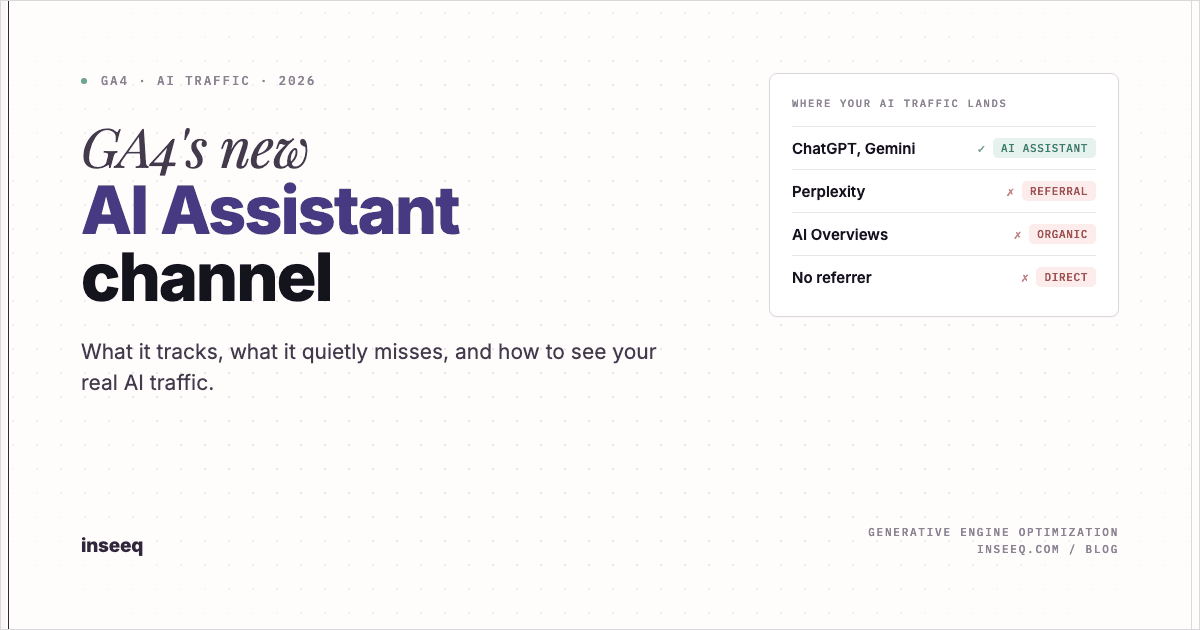
GA4 AI Assistant channel: where your AI traffic lands in Google Analytics
You open Google Analytics on a Monday morning, pull up your acquisition report, and there it is: a channel you have never seen before. "AI Assistants." It already has sessions in it. Nobody on your team set it up. And the obvious question lands immediately: where did this come from, and can you trust the number next to it?
That channel is new, it is automatic, and it is the clearest signal yet that Google considers AI assistants a real acquisition source rather than a rounding error. It is also incomplete in ways that matter for how you report, budget, and plan. This guide explains what the AI Assistant channel actually does, the traffic it silently leaves out, and how to track your full AI footprint so you are not making decisions on half the picture.
What changed: GA4 added a native AI Assistant channel
On May 13, 2026, Google added a new AI Assistants channel to the GA4 Default Channel Group. Broad availability across properties followed in early June. There was no announcement in your account, no toggle to flip, and no developer work required. If you use GA4, you have it.
The channel sits in your standard acquisition reports alongside the channels you already know: Organic Search, Paid Search, Direct, Referral, Organic Social, Email, and the rest. When a visitor arrives from a recognized AI assistant, GA4 now files that session under AI Assistants instead of burying it inside Referral, where it used to land.
This is a meaningful shift. For the past two years, traffic from tools like ChatGPT was technically measurable but practically invisible. You could see a referral from `chat.openai.com` if you went looking, but it was mixed in with every other referring domain and easy to ignore. Now it has a dedicated line in the report that a CMO can read at a glance. For the underlying mechanics, Google documents every channel rule in Google's official Default channel group definitions, and the broader reporting context lives in GA4's channel reporting documentation. The launch itself was confirmed across the industry, including Search Engine Journal's report on the launch.
How the AI Assistant channel works under the hood
The mechanism is simple once you see it. GA4 reads the referrer of an incoming session. If that referrer matches Google's internal list of AI assistants, GA4 assigns the session a medium of `ai-assistant` and a campaign of `(ai-assistant)`. Those values are what map the session into the AI Assistants channel in the Default Channel Group.
Per Google's documentation, the channel covers arrivals "from sources like ChatGPT, Gemini, Deepseek, Copilot, or Grok." The list is broader than many people assume, and it deliberately excludes Google's own AI products, which matters more than it sounds (more on that below). Google has not published a complete, public list of every recognized referrer, and the safe assumption is that the list expands quietly over time as new assistants gain traffic share.
Here is how the new channel compares to where this traffic used to go:
Traffic source | Before May 2026 | After May 2026 |
|---|---|---|
ChatGPT, Gemini, Copilot, Deepseek, Grok (with referrer) | Referral | AI Assistants |
Perplexity | Referral | Referral (unchanged) |
Google AI Overviews and AI Mode | Organic Search | Organic Search (unchanged) |
Any AI tool with no referrer passed | Direct | Direct (unchanged) |
The pattern in that table is the whole story. The new channel cleans up one specific case: known consumer assistants that pass a referrer header. Everything else stays exactly where it was. That is what makes the AI Assistant channel useful and incomplete at the same time.
One practical note on identification: because classification depends on the `ai-assistant` medium, you can verify and slice this traffic yourself using Session source / medium as a secondary dimension. If you see `ai-assistant` in that field, the channel is working as intended.
What the AI Assistant channel tracks, and what it silently misses
This is the part that decides whether you report AI traffic correctly or fool yourself. The channel captures a real slice of AI referrals, but four large categories of AI-driven traffic never reach it.
Perplexity still lands in Referral. Perplexity is one of the highest-intent AI search tools in the market, and it is not in the named set that triggers the channel. Sessions from Perplexity continue to be classified as Referral, mixed in with newsletters, partner sites, and every other referring domain. If Perplexity is sending you buyers and you only read the AI Assistants channel, you will undercount your AI performance and misattribute some of your best traffic.
AI Overviews and AI Mode count as Organic Search. When someone clicks through to your site from a Google AI Overview or from AI Mode, GA4 treats it as Organic Search, because the referrer is still Google. The new channel explicitly excludes Google's own AI surfaces. For most businesses, AI Overviews drive far more impressions than standalone chatbots, so the single largest source of AI-influenced traffic is invisible inside the channel built to measure AI traffic. It is hiding inside your Organic number.
Referrer-less AI traffic lands in Direct. A large share of AI assistant traffic carries no referrer at all. Desktop apps, mobile apps, in-answer citations that open without passing a header, and privacy settings that strip the referrer all produce sessions with no source. GA4 has no way to know those visitors came from an AI tool, so they fall into Direct, the channel that already absorbs everything analytics cannot explain. This is the most common reason a marketer says "my AI traffic is showing as Direct in GA4." It is not a bug. It is the absence of a referrer.
The data is not retroactive. The channel started classifying traffic from its launch forward. Historical sessions stay in whatever channel they were assigned at the time, so you cannot rebuild a clean AI traffic trend going back a year. Your baseline starts now.
Add those four together and the conclusion is uncomfortable but clear: the AI Assistants channel is a floor, not a ceiling. It tells you the minimum amount of AI traffic you are getting from a handful of named tools that happen to pass a referrer. Your true AI footprint is larger, and the gap is concentrated in exactly the sources that tend to convert best.
Why this matters for marketing teams
If the channel undercounts, why care? Because the people who read your dashboards make decisions with those numbers.
When AI traffic is scattered across Referral, Organic, and Direct, three things happen. First, you under-invest in a growing channel because it looks smaller than it is. A board sees a thin AI Assistants line and concludes AI search is not worth resourcing, while the real volume sits unlabeled inside Organic and Direct. Second, you misattribute conversions. A pipeline that AI search actually generated gets credited to Direct or branded Organic, so the channel that earned the revenue never shows up in the business case. Third, you lose the trend. AI referral patterns are changing month over month right now, and a measurement setup that only captures a fraction of the signal cannot tell you whether your GEO efforts are working.
AI-assistant traffic also tends to behave differently from generic referral traffic. These visitors often arrive after an assistant has already answered their question and recommended or cited you, which means they arrive warmer and further along than a cold search click. Counting that traffic accurately is not a vanity exercise. It is how you justify the budget to capture more of it.
The action playbook: how to track AI traffic in GA4 properly
You do not need to wait for Google to fix the gaps. You can recapture most of the missing AI traffic with configuration you control. Here is the practical sequence.
1. Confirm the native channel is live. In GA4, open Reports, then Acquisition, then Traffic acquisition. Add Session source / medium as a secondary dimension and look for `ai-assistant`. If it is there, the channel is working and you have a clean baseline for the named assistants.
2. Build a custom channel group that recaptures the misses. GA4 lets you create a custom channel group in the Admin area without touching the Default Channel Group. Create one new channel, call it something like "AI Search (Full)," and define rules that catch the sources Google leaves out: the `ai-assistant` medium, plus source-contains rules for Perplexity, plus the referring domains for any assistants not yet recognized. This pulls Perplexity out of Referral and groups it with the native AI traffic so you finally see one honest total.
3. Tag AI Overviews where you can. You cannot reclassify Organic from inside GA4, but you can separate AI-influenced organic traffic using Search Console landing-page and query analysis, and by watching for the behavioral signatures of AI Overview clicks. This is the hardest gap to close cleanly, so treat it as directional rather than exact.
4. Reduce the Direct leakage with UTM hygiene. Wherever you control a link that an AI tool might surface, such as documentation, help content, or syndicated assets, add UTM parameters so referrer-less clicks still carry a source. You will never tag every path, but disciplined UTMs convert a slice of mystery Direct traffic into attributable AI traffic.
5. Report on the full picture, not just the native channel. Build one exploration or one Looker Studio view that combines the native AI Assistants channel, your custom Perplexity rule, and your best AI Overviews estimate into a single AI search figure. That number, not the raw channel, is what belongs in your monthly report.
Steps two through five are exactly what we packaged into the GA4 AI Traffic Tracking Kit: a ready-to-paste custom channel group definition, the source and medium rules that recapture Perplexity and other missed assistants, and a Looker Studio dashboard layout that shows your complete AI footprint in one view. It turns this playbook into a thirty-minute setup instead of a research project. You can also run a free AI visibility check to see how often AI engines surface your brand in the first place, which is the upstream number that determines how much AI traffic you can capture at all.
Turn AI visibility into AI traffic
Measuring AI traffic accurately is step one. The bigger opportunity is increasing it. AI assistants only send you visitors when they cite, recommend, or quote you in their answers, and getting cited is a discipline of its own, often called generative engine optimization, or GEO.
GEO overlaps with classic SEO but is not identical. AI engines decompose a question into sub-questions, pull from sources that answer those sub-questions clearly and credibly, and synthesize an answer with citations. To earn those citations you need content that is structured for extraction, factually precise, and authoritative enough to be trusted as a source. The clean version of your measurement setup tells you whether that work is paying off, because once your custom channel group is live, a rising AI search total is direct evidence that your GEO efforts are landing.
This is where measurement and growth connect. You instrument the channel so you can see it, then you build the content and authority that make the channel grow. If you want help on either side, our SEO and GEO optimization work covers both the visibility and the execution, and the team at inseeq runs the same playbook on our own properties before we put it in front of a client.
Frequently asked questions
Does GA4 track AI traffic now? Partly. GA4 added a native AI Assistants channel in May 2026 that automatically classifies referral traffic from named tools like ChatGPT, Gemini, Deepseek, Copilot, and Grok. It does not capture Perplexity, Google AI Overviews, or any AI traffic that arrives without a referrer, so it tracks a subset rather than the total.
How do I see AI traffic in GA4? Open Reports, then Acquisition, then Traffic acquisition, and look for the AI Assistants channel. Add Session source / medium as a secondary dimension and look for the `ai-assistant` medium to verify and isolate the sessions.
Does GA4 track Perplexity traffic? Not in the AI Assistants channel. Perplexity is not in Google's named set, so its sessions still land in Referral. You need a custom channel group with a source rule for Perplexity to group it with your other AI traffic.
Why is my AI traffic showing as Direct in GA4? Because the session arrived without a referrer. Many AI assistants, especially desktop and mobile apps, do not pass a referrer header, so GA4 cannot identify the source and files the session under Direct. UTM parameters on links you control recover part of this.
Are Google AI Overviews counted in the AI Assistant channel? No. The channel excludes Google's own AI products. Clicks from AI Overviews and AI Mode are still classified as Organic Search because the referrer is Google.
Is the AI Assistant channel retroactive? No. It classifies traffic from launch forward. Historical sessions keep their original channel, so your clean AI baseline starts from May 2026 onward.
How do I track the full picture of AI traffic in GA4? Combine the native AI Assistants channel with a custom channel group that recaptures Perplexity and other missed sources, add disciplined UTMs to reduce Direct leakage, and report the combined figure in one Looker Studio view rather than reading the native channel in isolation.
See your real AI traffic, then grow it
GA4's AI Assistants channel is a useful start and a partial answer. It proves AI search is a channel worth naming, while quietly leaving out Perplexity, AI Overviews, and every referrer-less visit. If you report only the native number, you will undercount your most valuable traffic and under-resource the channel that is growing fastest.
Fix the measurement first, then build the visibility that fills it. If you want a clear read on where your AI traffic actually comes from and how to capture more of it, request a growth audit and we will map your full AI footprint and the work it takes to grow it.

Hans-Peter Frank
Co-founder
How Visible Is Your Business in AI Search?
Find out in 60 seconds. Our free AI Visibility Checker scans ChatGPT, Perplexity, and Google AI Overviews for your brand.
Check Your AI Visibility